How to use Covered Call Tracker
Covered Call Tracker
Record the wheel for each stock and see the premium, the basis after premiums and the return on capital.
Bought Covered Call Tracker? Sign in with the email you bought it with to download the latest version or ask me a question.
On this page
Covered Call Tracker is a calculator for your own numbers, not financial advice. It’s record keeping only, not a tax report.
Install
Covered Call Tracker requires macOS 14 Sonoma or later, on Apple silicon or Intel. Download the ZIP from the order page or your Creem receipt. Unzip it and move the app to Applications.
The app checks for updates once a day. When a new version is ready, click Install and Relaunch. To check anytime, choose Covered Call Tracker → Check for Updates….
Start a campaign
A campaign is one stock you run the wheel on, from the first put to the shares being called away. Click Start a Campaign… on the first screen, or New Campaign at the bottom of the sidebar (File → New Campaign…, Command-N). Type the ticker and check Shares per contract, 100 for standard options. Add an optional note, then click Create and Add First Trade.
Add events
Click Add Event (Command-E) on a campaign page and pick the event:
- Options: Sell put, Sell call, Buy to close, Roll, Expired worthless.
- Assignment: Put assigned, Called away.
- Shares and cash: Buy shares, Sell shares, Dividend.
The fields change with the event. Selling an option asks for Contracts, Strike, Expiry, Premium per share and Fees (commissions for the whole order). A closing event asks Which option it closes. Roll asks for the price paid to close, then New strike, New expiry and New premium per share, and records the net credit or debit as one event. Share trades take the shares and the price, and a dividend takes the amount received.
A line under the form says what the event does and what the premium and shares will be after it. If something’s wrong, a red sentence says what, and Save is off with the reason next to it.
The Open options list on the campaign page has Expired, Assigned, Roll… and Buy to Close… next to each option. They open the event sheet filled in for that option.
Naked calls
Selling a call that the campaign’s shares don’t cover shows an orange warning, and the button becomes Save Naked Call…. You have to confirm in a dialog before it’s saved.
Edit or delete an event
Each event in the Timeline has an edit and a delete button. After a change, every number is worked out again from the events. An edit that would break a later event is refused with the reason.
The … menu next to Add Event has Edit Ticker, Multiplier and Note… and Delete Campaign….
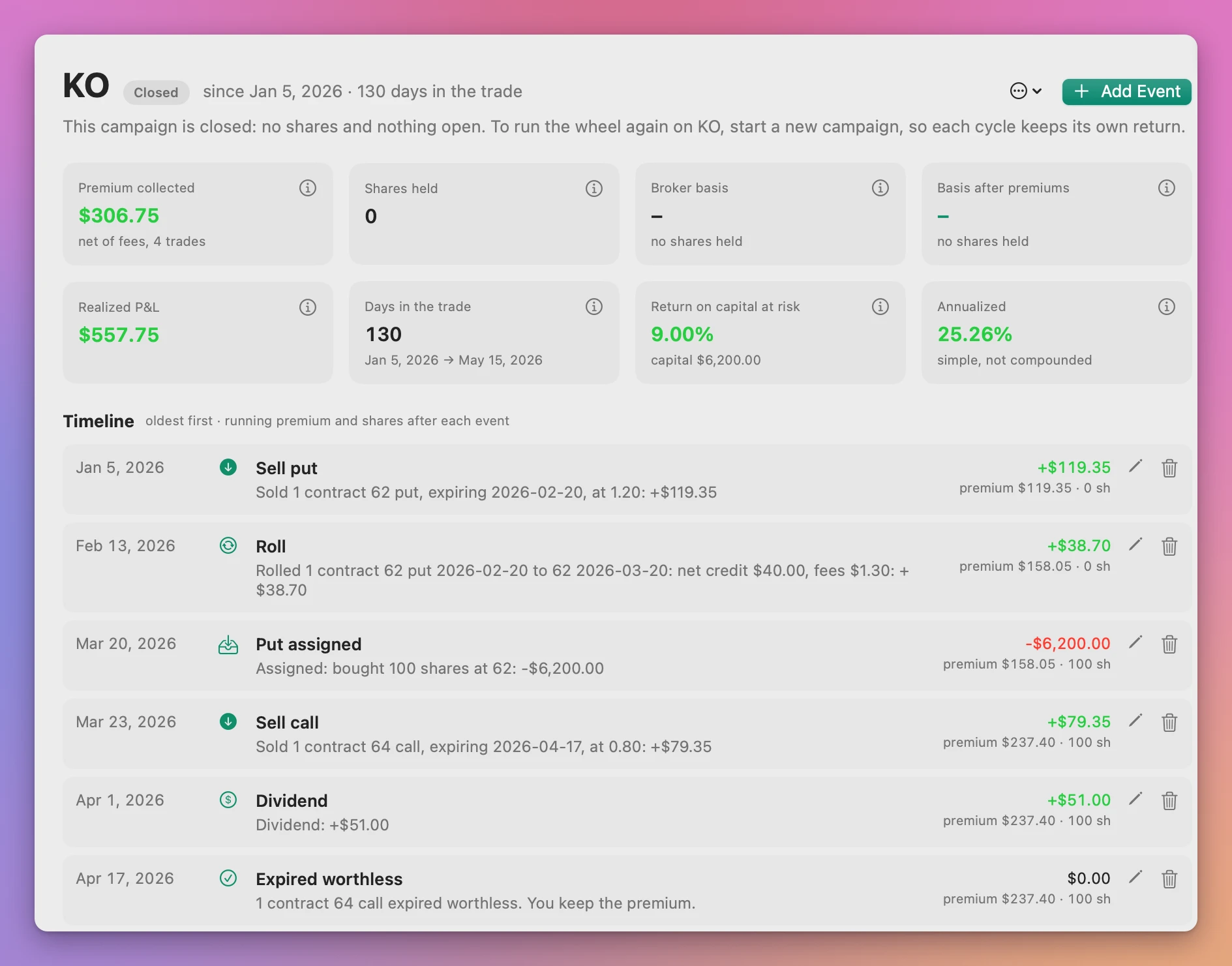
The numbers
Click the ⓘ on any card to see its formula with the campaign’s own figures.
- Premium collected: premium received × 100 × contracts, minus premium paid to close, minus option fees. A roll counts its net credit or debit minus fees.
- Broker basis: the cost of the shares held, fees included, divided by the shares.
- Basis after premiums: share cost minus premium, dividends and gains on shares already sold, divided by the shares.
- Capital at risk: the most tied up at once, the strike × 100 × contracts for open puts plus the cost of shares held.
- Return on capital at risk: premium plus dividends plus share gains, divided by the capital at risk.
- Annualized: the return × 365 ÷ days, simple, shown from the seventh day.
A campaign closes when it holds no shares and nothing is open. Trades for that ticker after that go into a new campaign, so each cycle keeps its own return.
Shares sold use the average cost. There are no tax lots, wash sales or holding periods, and the app doesn’t fetch prices, so shares you hold aren’t valued.
Overview
Overview in the sidebar shows the premium this year, the P&L realized on closed campaigns, the open campaigns and the options expiring within 7 days. Below that are a chart of net premium per month, an Expires this week list, the open options by expiry, and a table of every campaign.
Import trades from a CSV
Choose File → Import Trades from CSV… (Shift-Command-I), or click Import Trades from CSV… on the first screen. Pick a CSV of option trades, then match the columns: trade date, symbol, action, put or call, strike, expiry, quantity, price per share, fees, commission and the date order. The app guesses them from the header.
It reads option symbols like AAPL 260220P00050000, -AAPL260220P50 and AAPL 02/20/2026 50.00 P, and actions like Sell to Open, STO, Buy to Close, BTC, Assigned and Expired. Files with the newest trade first are read in the right order.
Each row has a tick box and a status (Will import, Left out, Needs your OK, Can’t import, Won’t count) with a reason. Share trades are left unticked so an assignment isn’t counted twice. Bought options and dividends are skipped. Click Import N Rows to add them. Each imported event’s note says which line it came from.
Export and backup
- File → Export Events as CSV… saves every event as a CSV.
- File → Export Backup… saves your campaigns to a file, and Import Backup… reads one back, showing how many campaigns will be added or replaced first.
- File → Show Data File in Finder shows the JSON file the app keeps in Application Support.
Settings has the display currency (the symbol only, nothing is converted) and the data file’s location.
Your trades stay on your Mac. The app never connects to a broker and never fetches prices. It uses the internet to check for and download updates.
Covered Call Tracker is $19, a one-time purchase.