How to use Font Coverage Checker
Font Coverage Checker
Check a font against your text, find every missing character with its file and line, and rank the fonts that have them.
Bought Font Coverage Checker? Sign in with the email you bought it with to download the latest version or ask me a question.
On this page
Install
Font Coverage Checker requires macOS 14 Sonoma or later, on Apple silicon or Intel. Download the ZIP from the order page or your Creem receipt. Unzip it and move the app to Applications.
The app checks for updates once a day. When a new version is ready, click Install and Relaunch. To check anytime, choose Font Coverage Checker → Check for Updates….
Pick a font
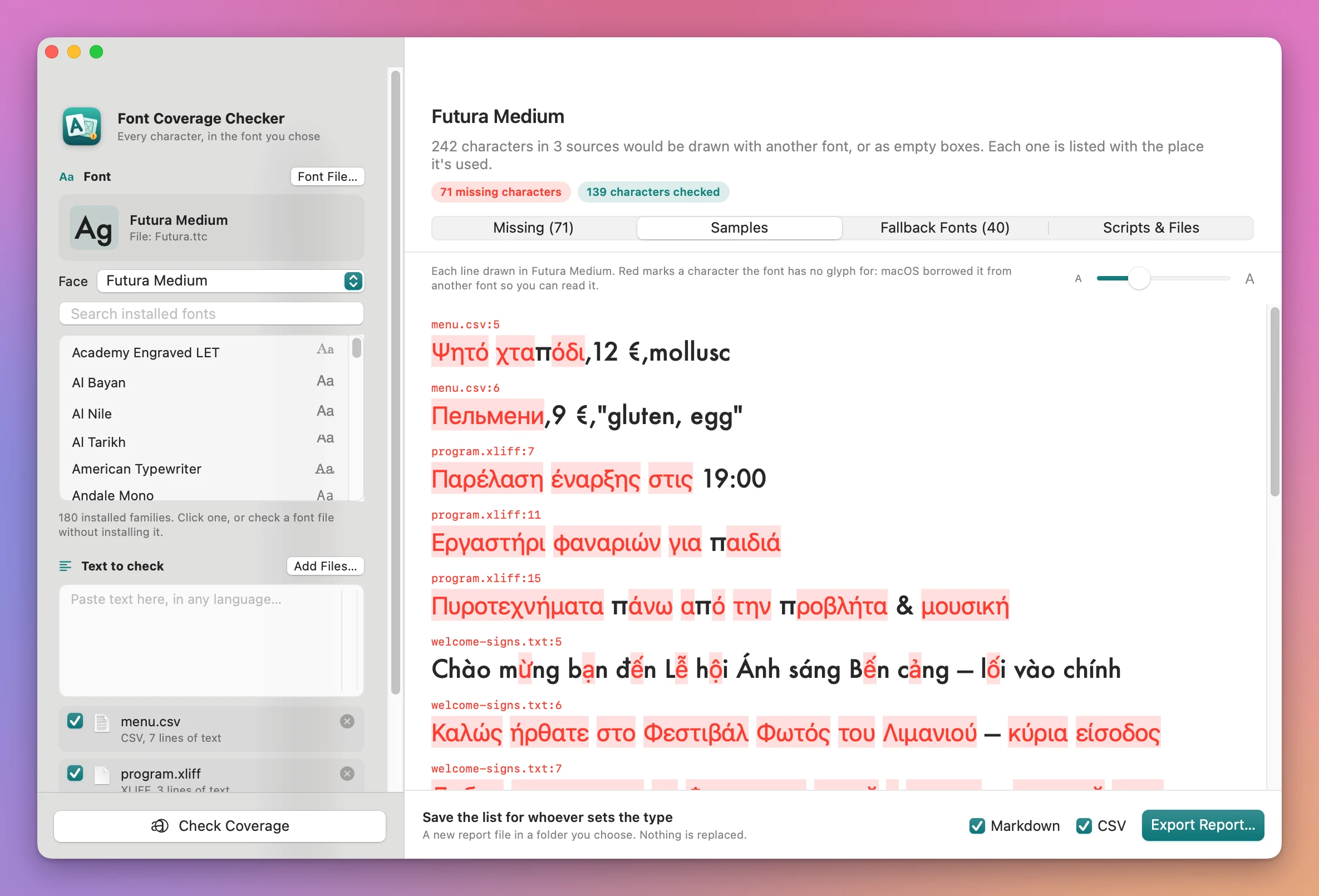
The sidebar lists every font family installed on your Mac, each with an “Aa” drawn in it. Type in Search installed fonts to narrow the list, and click a family. The app picks its most regular face, and the Style menu switches to another one.
To check a font that isn’t installed, click Font File… or drop a .ttf, .otf, .ttc or .otc file on the font card. A collection (.ttc, .otc) gets a Face menu. The file is used only by the app while it’s open, so the samples can be drawn in it. Nothing is installed. A file macOS can’t read as a font gets a red sentence under the card.
Add the text
Paste text in any language into the Text to check box. To check files, click Add Files… or drop files or folders on the window. Folders are searched, subfolders included.
| File | What’s checked |
|---|---|
.txt, .md | Every line |
.csv | Every line |
.strings | The values, never the keys or comments. Escapes are decoded. Compiled .strings files work too |
.json | The string values, never the keys. \u escapes are decoded |
.xliff, .xlf | The <target> text, or <source> when there are no targets |
Each file has a checkbox to leave it out, its kind and how many lines it has. A note shows up when something about the file matters, like a file read as Windows Latin 1 because it isn’t UTF-8, or an XLIFF file with no translations. A file that can’t be read (invalid JSON or XLIFF, a binary file, a type the app doesn’t read) gets a red sentence and stays unticked. The original files are only read.
Check
Click Check Coverage or press Command-R. When the app can’t check yet, a “Next: …” line under the button says what’s missing.
Spaces, tabs, line breaks, control characters and invisible format characters (zero width joiners, variation selectors) aren’t counted. A no-break space is.
Read the results
The header shows the font, a summary, and pills for missing characters, emoji sequences that come apart, scripts that need a shaping check and how many characters were checked. If the font gives almost every character the same one or two glyphs, a red banner says it’s a placeholder font.
- Missing: one row per missing character with its code point, Unicode name, script, count and first places. Click a row to see up to 25 lines it’s in, with the character highlighted, and the fonts that have it. Below the list are the emoji sequences that come apart and the Needs a shaping check list.
- Samples: every line with a problem, then up to 30 clean ones, drawn in the font at 12 to 48 points. Missing characters are in red boxes.
- Fallback Fonts: All installed fonts or My shortlist, ranked by how many of the missing characters each font has. Click the star to add a font to the shortlist, and Check with This Font to run the same text against it. The shortlist is remembered, and has its own search field to add families.
- Scripts & Files: characters and missing characters per script, each source with its counts and notes, and the files that weren’t checked, with the reason.
Shaping checks
Arabic, Hebrew, Devanagari and other Indic scripts, Thai, Lao, Khmer, Myanmar, Tibetan and Mongolian need the font’s shaping rules to join, reorder and place marks. Having a glyph for each character doesn’t prove the text comes out right. The app lists text in these scripts under Needs a shaping check, and does the same for letters built from separate combining accents. Proof that text in the font before you print.
Emoji
The app counts the glyphs macOS draws for joined emoji (like the family ones), flags, keycaps, tag sequences and skin tones. When a sequence is drawn as more than one piece, it’s listed as split.
Save a report
Tick Markdown, CSV or both in the footer and click Export Report…, then choose a folder.
Coverage report - <font>.mdhas the summary, the scripts, every missing character with its lines, the shaping checks, the fallback fonts, the sources and the limits.Coverage report - <font>.csvhas one row per missing character: kind, character, code point, name, script, occurrences, places, fonts that have it and a note.
If a file with that name is already there, the new one is named with (2), (3) and so on. The done screen has Show in Finder, Back to the Results and Check Other Text.
Limits
- Scripts are grouped by Unicode block, not the full Unicode Script property.
- Fallback ranking uses one face per family, the most regular one, and only installed fonts. The shortlist takes installed families, not files.
- OpenType features (small caps, figures, ligatures), kerning and vertical metrics aren’t checked.
- Placeholder fonts are left out of the fallback list.
Command line
The app includes a command line tool at Font Coverage Checker.app/Contents/Helpers/font-coverage-checker.
font-coverage-checker check --font "Futura" welcome-signs.txt menu.csv --out reports --format md,csvOther commands: check --font-file Futura.ttc --face 1, fonts --search futura, faces Futura.ttc and capabilities. Add --json for JSON output, --fallbacks N to change how many fallback fonts are listed and --shortlist "Helvetica Neue,Noto Sans" to rank only those. check exits with 0 when everything is covered, 2 when characters are missing or an emoji sequence comes apart, and 1 on errors.
Fonts and text are checked on your Mac. The app uses the internet to check for and download updates.
Font Coverage Checker is $20, a one-time purchase.