
Install Image Sequence Checker
Image Sequence Checker runs on macOS 14 Sonoma or later, on Apple silicon and Intel Macs. After buying, you land on a page with a Download button. You can also get the app from your Creem receipt. Unzip the app and drag Image Sequence Checker to your Applications folder.
The app is signed and notarized by Apple. Confirm Open at the normal first-launch prompt.
The app asks for nothing when it opens. When the folder you choose is on an external or network drive, or in Desktop, Documents or Downloads, macOS may ask once whether Image Sequence Checker can read it. Click Allow. The app only reads the frames.
The app checks for updates once a day. When a new version is ready, click Install and Relaunch. To check anytime, choose Image Sequence Checker → Check for Updates….
Choose the folder of frames
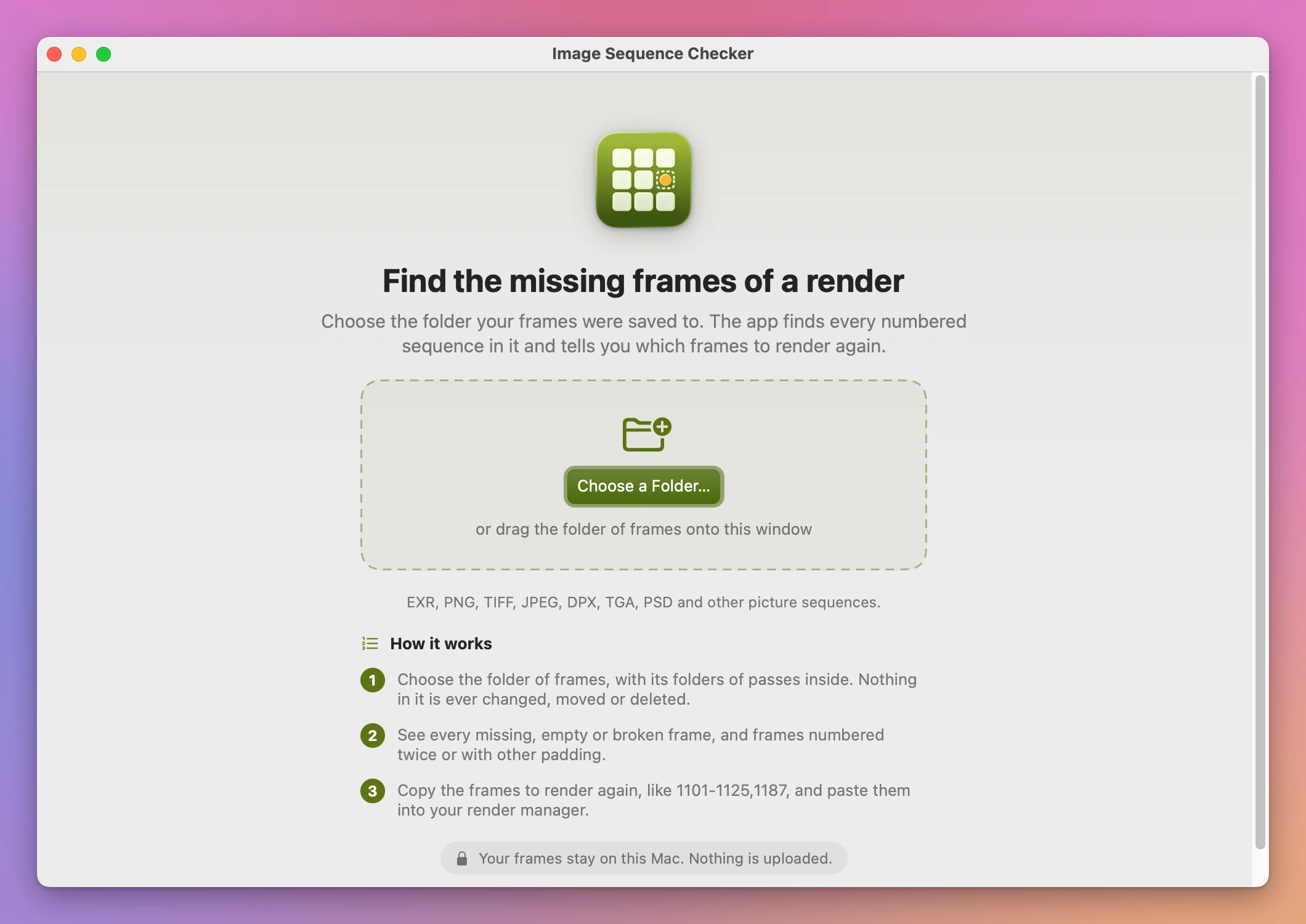
There are four ways:
- click Choose a Folder…, or choose File → Open Folder… (⌘O), and pick the folder;
- drag the folder onto the window;
- drag it onto the app’s icon in the Dock;
- in the Finder, right-click the folder and choose Open With → Image Sequence Checker.
Pick the folder the render was saved to. Folders inside it are read too, so a shot folder with beauty, shadow and matte folders gives three sequences. If you drop a single frame, its folder is checked.
The app reads the names first, then opens every frame to check it. The window shows “612 of 936 frames” while it works. Thousands of 4K EXR frames take a while; frames on a network drive take longer. Click Stop to go back to the start.
How the app finds a sequence
A sequence is three or more pictures in the same folder whose names differ only by a number: sh020_beauty.1001.exr, sh020_beauty.1002.exr and so on. The number is the last run of digits in the name. Two passes in the same folder, like beauty.####.exr and shadow.####.exr, are two sequences.
The pattern shows a # for each digit: sh020_beauty.####.exr is padded to four digits. Pictures that aren’t part of a sequence, like a poster frame, are counted under the folder’s name and otherwise left alone.
It reads EXR, PNG, TIFF, JPEG, DPX, TGA, PSD, BMP, HDR, JPEG 2000, WebP and HEIC frames.
Read the results
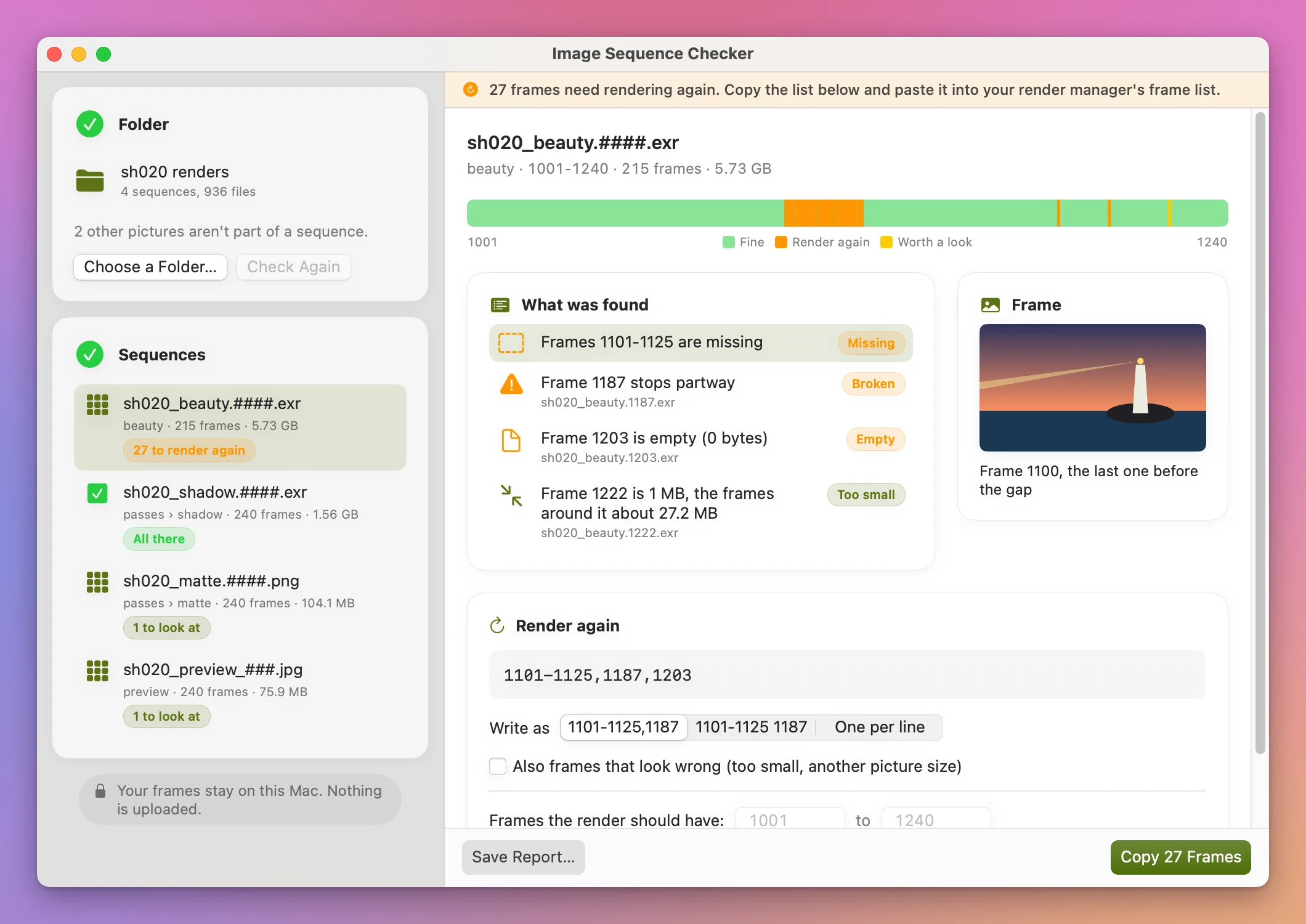
On the left, under Sequences, each one has a pill:
- All there: every frame from the first to the last is there and opens.
- 27 to render again: that many frames are missing, empty or broken.
- 2 to look at: nothing to render again, but something worth a look, like a frame numbered twice.
Click a sequence to see it on the right. The line at the top says what to do next. Under the sequence’s name, the bar shows the whole range: green frames are fine, orange ones need rendering again, yellow ones are worth a look.
What was found has one row per problem:
| Row | What it means | In the list to render again |
|---|---|---|
| Missing | Frame numbers with no file, as ranges | Yes |
| Empty | Files of 0 bytes | Yes |
| Broken | Files that can’t be opened, or stop partway | Yes |
| Too small | Under half the size of the frames around it | When you tick the box |
| Other size | A different picture size from most frames | When you tick the box |
| Twice | One frame number in two files | No |
| Padding | A number written with a different count of digits | No |
| Outside range | Before or after the frames the render should have | No |
Click a row to see its frame under Frame. For missing frames you see the last good frame before the gap, so you know where the render stopped. Empty and broken frames can’t be shown. DPX frames can’t be drawn on a Mac, so their preview says so; their header and size are still checked.
Broken frames
A crash or a full disk often leaves a frame that’s only half written. It has a believable size and a name like the others, and the Finder shows nothing odd. The app opens each frame and reads it to the end. A PNG, JPEG, TGA, TIFF or EXR that stops early is Broken with “stops partway”. A file that isn’t a picture at all, or one macOS can’t read, is “can’t be opened”.
Frames that look wrong
A frame much smaller than its neighbours can be a black frame from a render that failed quietly, or a real fade to black. A frame at 1920 × 1080 in a 4K render was probably rendered with the wrong settings. Both are marked, and they go in the list only when you tick Also frames that look wrong (too small, another picture size).
Frames there twice, and padding
render_0015.png and render_0015 copy.png are the same frame twice, often from a copy in the Finder. render_0012.png and render_12.png too. The row names both files, the first one being the one that fits the sequence. Many editing and compositing apps read the extra file as a separate clip or stop the sequence there, so move or delete the extra one in the Finder. The app never does it for you.
A Padding row is a frame whose number has a different count of digits from the rest, like sh020_preview_99.jpg among sh020_preview_098.jpg and sh020_preview_100.jpg. Rename it to match. A sequence that grows from 9999 to 10000 isn’t a padding change.
Set the frames the render should have
The app can’t know about frames missing after the last file. If the render should go to 1250 and stopped at 1240, the folder looks complete.
Scroll to Frames the render should have, under the list, and type the first and last frame, like 1001 and 1250. Press Return or click elsewhere. Frames 1241-1250 now show as missing, and the bar and the list include them. Frames outside the range you typed show as Outside range.
Clear both fields, or click Use the Files, to go back to the first and last file. Each sequence keeps its own range until you choose another folder.
Copy the frames to render again
Render again shows the list, like 1101-1125,1187,1203. Pick how it’s written under Write as:
1101-1125,1187: commas, the form most render managers take in their frame list;1101-1125 1187: spaces;- One per line.
Click Copy 27 Frames (the number is the frames in the list), or choose Edit → Copy Frames to Render Again (⇧⌘C). A green line confirms what was copied. Paste it into the frame list of your render manager or your 3D app’s render settings.
The list is for the selected sequence. To render the frames of another pass, select it and copy again. When nothing needs rendering again the button is off, with “Nothing to render again.” next to it.
Save a report
Click Save Report… (⌘S) and pick where. The report is a spreadsheet (CSV) that opens in Numbers or Excel, named after the folder, like “sh020 renders frames report.csv”. It has every sequence, one row per problem with its frames and a sentence, and a Render again row with the list for each sequence that needs one. A complete sequence gets an All there row.
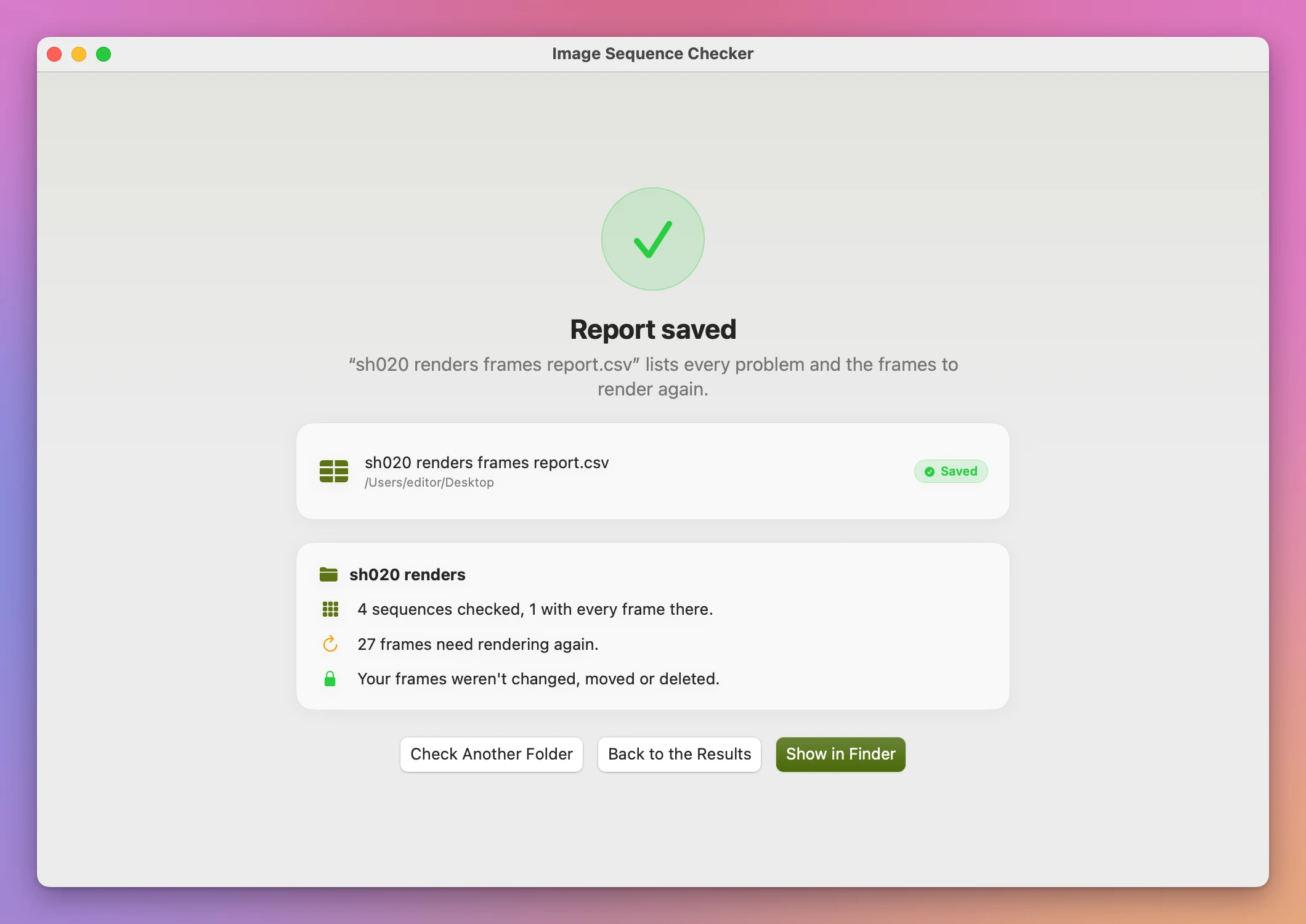
Click Show in Finder to see the file, Back to the Results to keep working, or Check Another Folder.
Check again after a re-render
When the missing frames are rendered, click Check Again in the sidebar, or choose File → Check Again (⌘R). The folder is read again and the ranges you typed are kept.
Troubleshooting
”None of the pictures in this folder is numbered like a frame”
The folder has pictures but none shares a name with a number in it with two others. Check you picked the folder of frames and not the one above it with only a poster in it. Folders inside the chosen one are read, so picking the shot folder is fine.
”There are no pictures in this folder”
The folder is empty, or holds only videos or other files. Image Sequence Checker reads still frames, not movie files.
The folder couldn’t be opened
The drive was ejected, the network share went away, or macOS didn’t allow the app to read it. Connect the drive, check you can open the folder in the Finder, then choose it again. If you clicked Don’t Allow at the macOS prompt, allow Image Sequence Checker in System Settings → Privacy & Security → Files and Folders.
A frame is marked too small but it’s fine
A fade to black or a frame with nothing in it compresses to a small file. Leave Also frames that look wrong off and it stays out of the list.
Privacy
Image Sequence Checker works on your Mac. It reads only the folder you choose and writes only the report you save. Nothing is uploaded. The frames are never changed, moved, renamed or deleted.
The app connects to updates.flaviocopes.com to check for new versions. There are no accounts and no analytics.
Image Sequence Checker isn’t made by, affiliated with or endorsed by Apple, Adobe, Autodesk, Blackmagic Design, Maxon, the Blender Foundation, Foundry or Thinkbox Software.