How to use Mailbox Duplicate Cleaner
Mailbox Duplicate Cleaner
Find the duplicate emails in exported mailboxes, review them, and write a cleaned copy with a report, without touching the originals.
Bought Mailbox Duplicate Cleaner? Sign in with the email you bought it with to download the latest version or ask me a question.
On this page
Install
Mailbox Duplicate Cleaner requires macOS 14 Sonoma or later, on Apple silicon or Intel. Download the ZIP from the order page or your Creem receipt. Unzip it and move the app to Applications.
The app checks for updates once a day. When a new version is ready, click Install and Relaunch. To check anytime, choose Mailbox Duplicate Cleaner → Check for Updates….
For help, choose Help › Mailbox Duplicate Cleaner Support. It opens the support site in your browser.
Export the mailboxes first
The app works on exported mailboxes, never on your mail app or your email account. In Mail, select a mailbox in the sidebar and choose Mailbox › Export Mailbox…. Mail writes a folder whose name ends in .mbox. A Gmail Takeout download already contains .mbox files.
The app reads:
.mboxfiles- the
Name.mboxfolders Mail exports - folders that hold any of those, up to five levels down, like an “Old laptop” folder with several exports
It doesn’t read Outlook .pst files, single .eml emails or folders of .emlx files.
Add the mailboxes
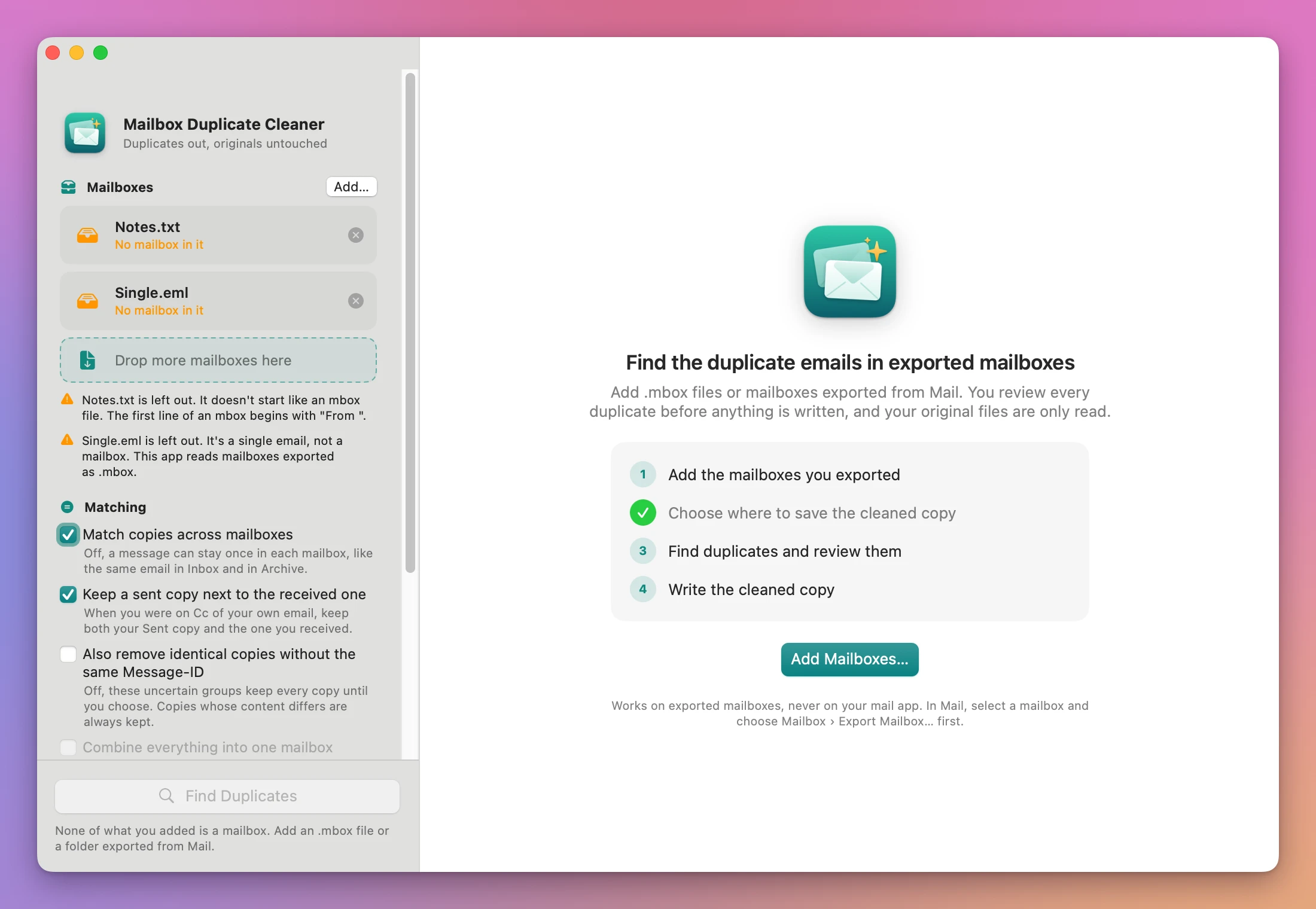
Click Add Mailboxes… on the start screen, Add… in the sidebar, or choose File › Add Mailboxes… (Command-O). You can also drop files on the window.
Each mailbox shows as a card, like “mbox file, 7 KB”, “Exported from Mail, 4 KB” or “Folder with 3 mailboxes”. Click the × on a card to leave it out.
Anything that isn’t a mailbox shows in orange with a sentence under the list saying why, for example “Notes.txt is left out. It doesn’t start like an mbox file.” or “Single.eml is left out. It’s a single email, not a mailbox.”
Choose where to save
Under Save in, click Choose… and pick a folder. The app writes a new folder inside it, named after the New folder field (“Cleaned mailboxes” by default). If that name is taken, it adds a number: “Cleaned mailboxes 2”.
When something is missing, a “Next: …” line under Find Duplicates says what.
Matching options
The Matching options in the sidebar are remembered between launches. Changing one after a search regroups the emails right away.
- Match copies across mailboxes (on): the same email in two mailboxes counts as a duplicate. Off, a message can stay once in each mailbox.
- Keep a sent copy next to the received one (on): when you were on Cc of your own email, both your Sent copy and the copy you received stay.
- Also remove identical copies without the same Message-ID (off): groups to check whose content is identical lose their extra copies too. Copies whose content differs are never removed on their own.
- Combine everything into one mailbox (off): one
Combined.mboxinstead of one cleaned mailbox for each. It needs two or more mailboxes.
Find and review the duplicates
Click Find Duplicates (Command-R). While it reads, the app shows a running count of emails and a Stop button.
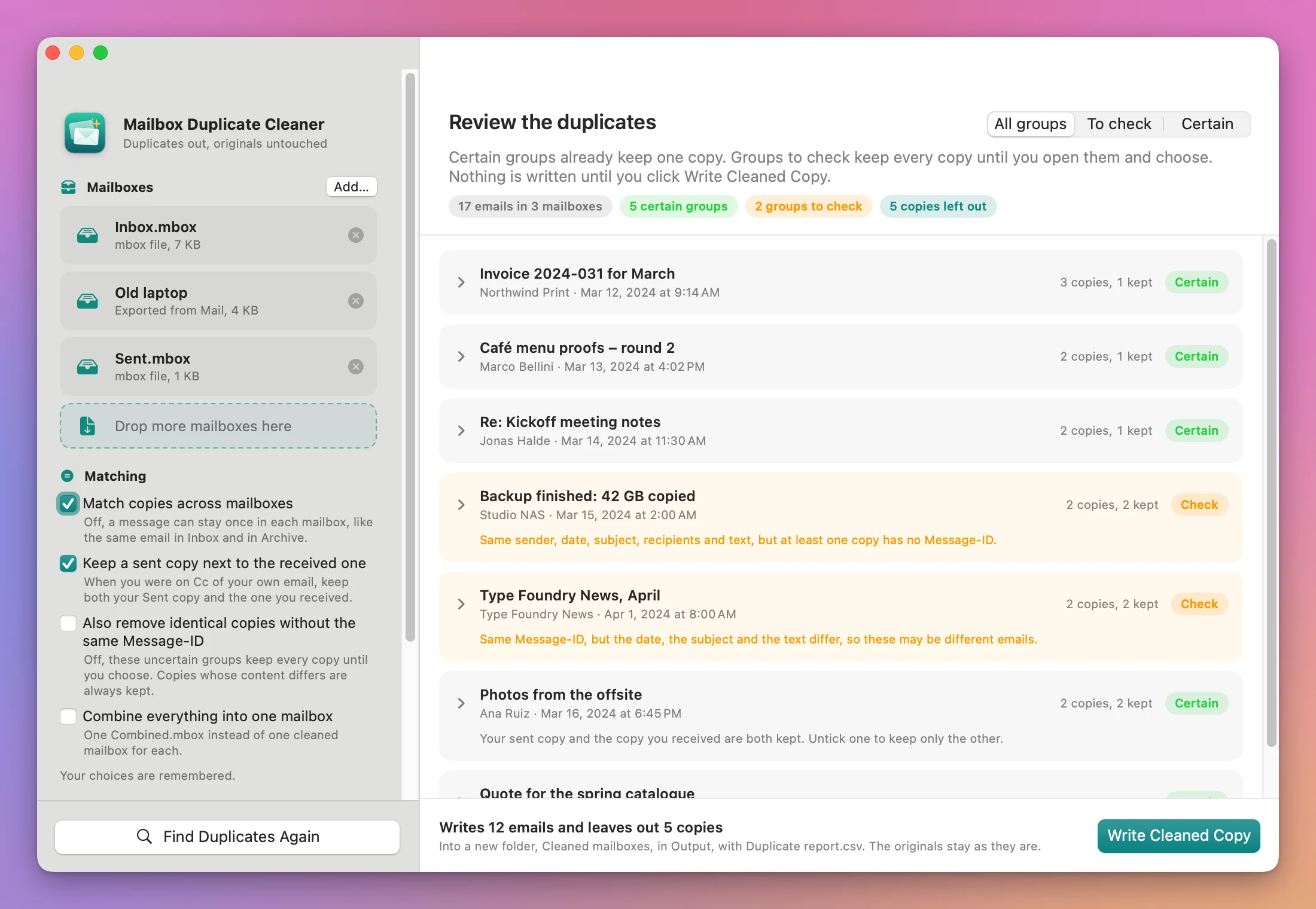
Review the duplicates shows how many emails it read, the certain groups, the groups to check and the copies left out. The All groups, To check and Certain filter shows one kind at a time.
How copies are found
Two emails are linked when they have the same Message-ID, or the same sender address, date, subject, recipients and text. Line endings and spaces at the end of lines don’t count, and neither do the Received headers and the headers mail apps add on import. A date written in two time zones counts as the same moment.
- Certain: one Message-ID on every copy, and the same content. The first copy stays, by mailbox order and then position.
- Check: the content matches but a copy has no Message-ID or a different one, or the Message-ID matches but the content doesn’t. Every copy stays until you choose. The card says the reason.
Compare and choose
Click a group to see its copies side by side. Each one shows its mailbox and position, Message-ID (“None” in orange when missing), From, To, Date, Subject, whether the text and attachments are the same as copy 1, the Received headers (none means a sent copy), the size, and the other headers that differ. Fields that differ from copy 1 are highlighted.
Tick Keep on each copy you want. Keep One of Each, Keep All and Suggested set the whole group at once.
Write the cleaned copy
The bar at the bottom says what will happen, for example “Writes 12 emails and leaves out 5 copies, into a new folder, Cleaned mailboxes, in Output, with Duplicate report.csv. The originals stay as they are.” Click Write Cleaned Copy.
The new folder holds:
- one cleaned
.mboxfor each mailbox, named after it (Inbox.mbox, andInbox (Old laptop).mboxfor a second Inbox), orCombined.mbox Excluded duplicates.mbox, every copy that was left outDuplicate report.csv, one row per copy in a duplicate group, with Group, Certainty, Why, Action (Kept or Excluded), Mailbox, Position, Message-ID, From, To, Date, Subject and Size
The original mailboxes are only read. The folder is written under a temporary name and appears only when it’s complete. If a mailbox changed after the app read it, the app refuses to write.
Click Show in Finder to open the folder, or Clean Other Mailboxes to start again.
Bring the cleaned mailboxes into Mail
In Mail, choose File › Import Mailboxes…, pick Files in mbox format, and choose the new folder. Mail adds the mailboxes under On My Mac.
Mail keeps only one email per Message-ID inside a mailbox when it imports. If you kept two different emails that share a Message-ID (a Check group), Mail shows only one of them.
Limits
- An email whose attachments another app re-encoded has different content, so it shows as “same Message-ID, different content” for you to decide.
- The cleaned mailboxes use Mac and Unix line endings, even when the original used Windows ones.
- Memory grows with the number of emails, about 2 KB per email.
Everything happens on your Mac. The app uses the internet only to check for updates.
Mailbox Duplicate Cleaner is $19, a one-time purchase.