How to use Podcast Archive Collector
Podcast Archive Collector
Archive the episodes of a podcast feed into a folder, with show notes, artwork, resume, new-episodes-only runs and a CSV of what's missing.
Bought Podcast Archive Collector? Sign in with the email you bought it with to download the latest version or ask me a question.
On this page
Install
Podcast Archive Collector requires macOS 14 Sonoma or later, on Apple silicon or Intel. Download the ZIP from the order page or your Creem receipt. Unzip it and move the app to Applications.
The app checks for updates once a day. When a new version is ready, click Install and Relaunch. To check anytime, choose Podcast Archive Collector → Check for Updates….
For help, choose Help → Podcast Archive Collector Support, which opens the support site in your browser.
Paste the feed address
A podcast’s feed is the RSS address podcast apps subscribe to. Look for a link labeled RSS or Feed on the show’s website, or copy it from your podcast app.
Click Paste Feed Address on the start screen to use the address on the clipboard, or type it in the Podcast feed field in the sidebar. Addresses that start with feed:// or podcast://, or have no https://, are accepted.
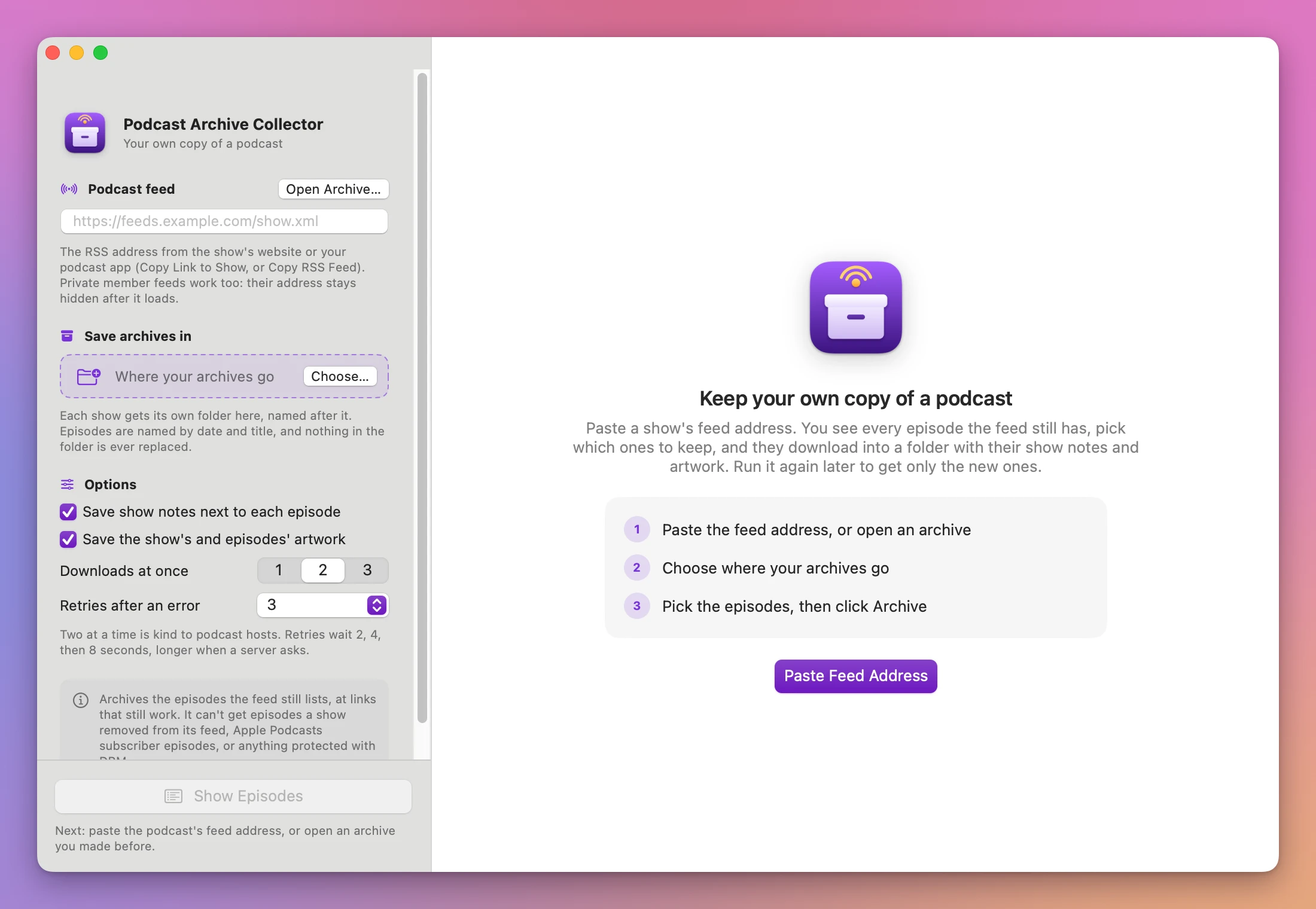
Once the feed loads, the field becomes a card with the show’s artwork, title, author and address. Change… lets you paste another feed.
If the address is an ordinary web page, an orange banner says “This address is a web page, not a podcast feed. Look for the RSS link on the show’s page, usually labeled RSS or Feed.”
Private feeds
A member feed with a key in the address, in a secret part of the query, or with user:password@ before the host works like any other feed. After it loads, the card shows the address with the key masked as ••••, a lock icon, and “Private feed: its key is hidden here and stored only in the archive folder”. The field is emptied, so the key doesn’t stay on screen.
The full address is saved only in the hidden .podcast-archive-collector.json file in the show’s folder, readable only by your user account. The window, feed.xml and Missing episodes.csv show it masked. A user name and password in the address are sent to the server as a sign-in, also for the artwork and audio on the same server.
Choose where archives go
Click Choose… under Save archives in, or drop a folder on the card. Each show gets its own folder inside it, named after the show, like ~/Podcasts/The Tidewater Workshop. The place is remembered between launches. Choosing or dropping a show folder you archived before opens that archive.
Options
- Save show notes next to each episode (on by default) writes an
.htmlfile next to each episode. - Save the show’s and episodes’ artwork (on by default) writes
cover.jpg, and a.jpgnext to each episode whose artwork differs from the show’s. - Downloads at once is 1, 2 or 3, and 2 by default. It’s per server.
- Retries after an error is None, 1, 3 or 5, and 3 by default. Retries wait 2, 4, then 8 seconds, doubling up to a minute, or what the server asks for.
All options are remembered.
Pick the episodes
Click Show Episodes, or press Command-R. Until a feed and a folder are set, the line under the button says what’s next.
The list shows every episode in the feed: a checkbox, the date, the title, the file name it saves as, the length and the size (“Size unknown” when the feed doesn’t say). Pills at the top count the episodes in the feed, the ones already archived, the ones to resume, the ones without an audio file, and the archived ones the feed no longer lists.
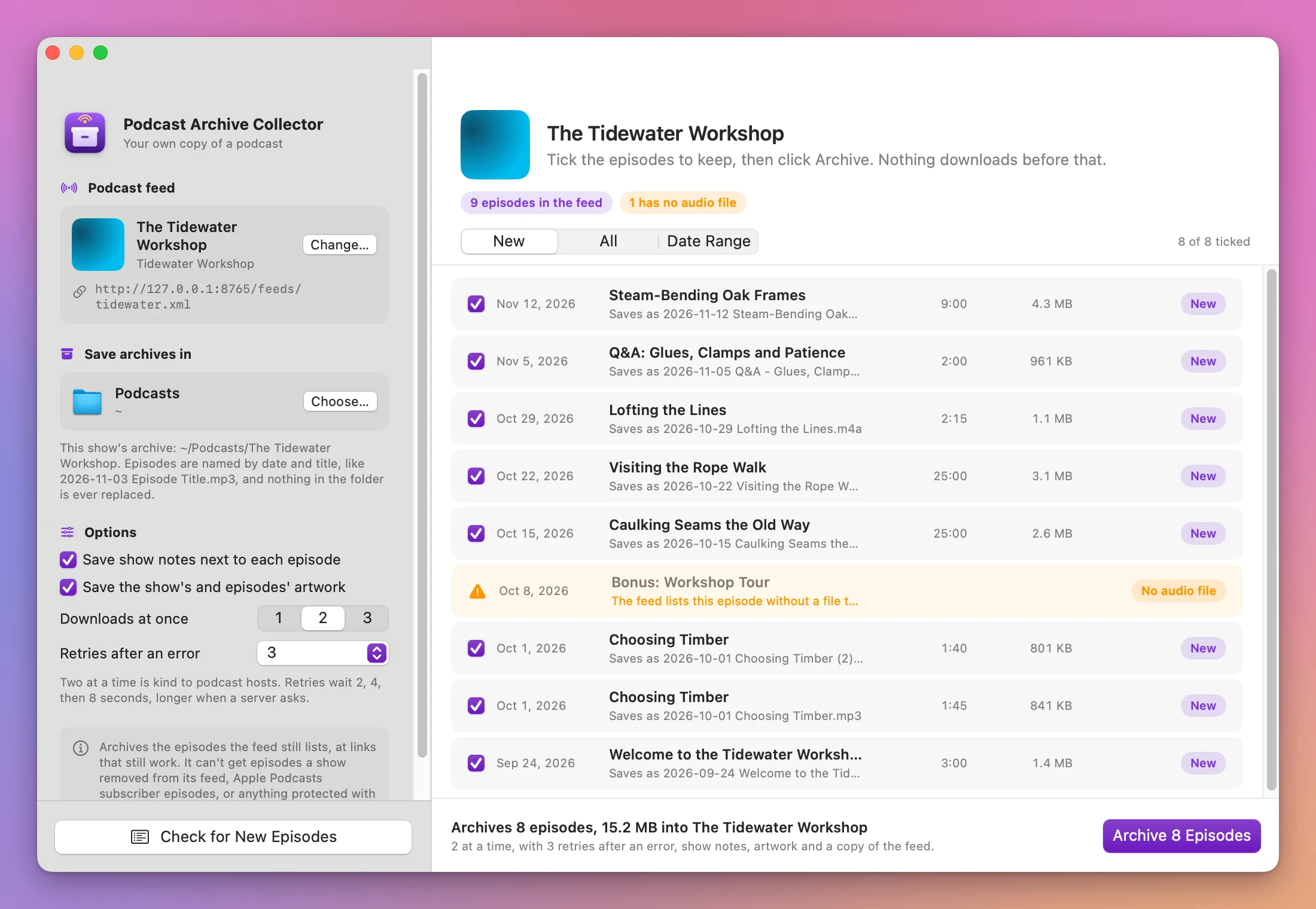
The picker at the top chooses what’s ticked:
- New ticks the episodes that aren’t in your archive.
- All ticks every episode.
- Date Range shows two dates, set to the feed’s oldest and newest episode, and ticks the episodes between them.
You can tick and untick single episodes too. Each row ends with a pill: New, Archived, Resumes at 2 MB, File missing (an archived file that was moved out of the folder, which downloads again under the same name), or No audio file (an orange row with no checkbox).
The footer sums up what will happen, like “Archives 8 episodes, 15.2 MB into The Tidewater Workshop”, and the button follows: Archive 8 Episodes, Resume Archiving, or Check Archive when every ticked episode is already archived. Check Archive refreshes their show notes and artwork without downloading the audio again.
Archive
The heading counts the finished, downloading and waiting episodes above a progress bar. Each row shows Waiting, a progress bar with the size, a retry countdown like “Retrying: The server had an error (HTTP 500). Try 4 of 4 in 8 s”, or the result.
Network errors, dropped connections and the HTTP errors 408, 425, 429 and 5xx are retried. 401, 403, 404 and 410 fail at once with a sentence. A file the server sends as a web page instead of audio fails with “The server sent a web page instead of the episode’s file. The link may need a sign-in, or it expired”.
Stop, or Esc, stops and keeps the partial files.
The result
The done screen says how many episodes were archived and how many couldn’t be, with pills for downloaded, already archived, resumed, failed, without audio, no longer in the feed and stopped. Failed episodes come first, with the reason. Then each archived file with its size and notes like “notes, artwork, resumed, after 2 tries”. Rows for Missing episodes.csv (with Open) and feed.xml follow.
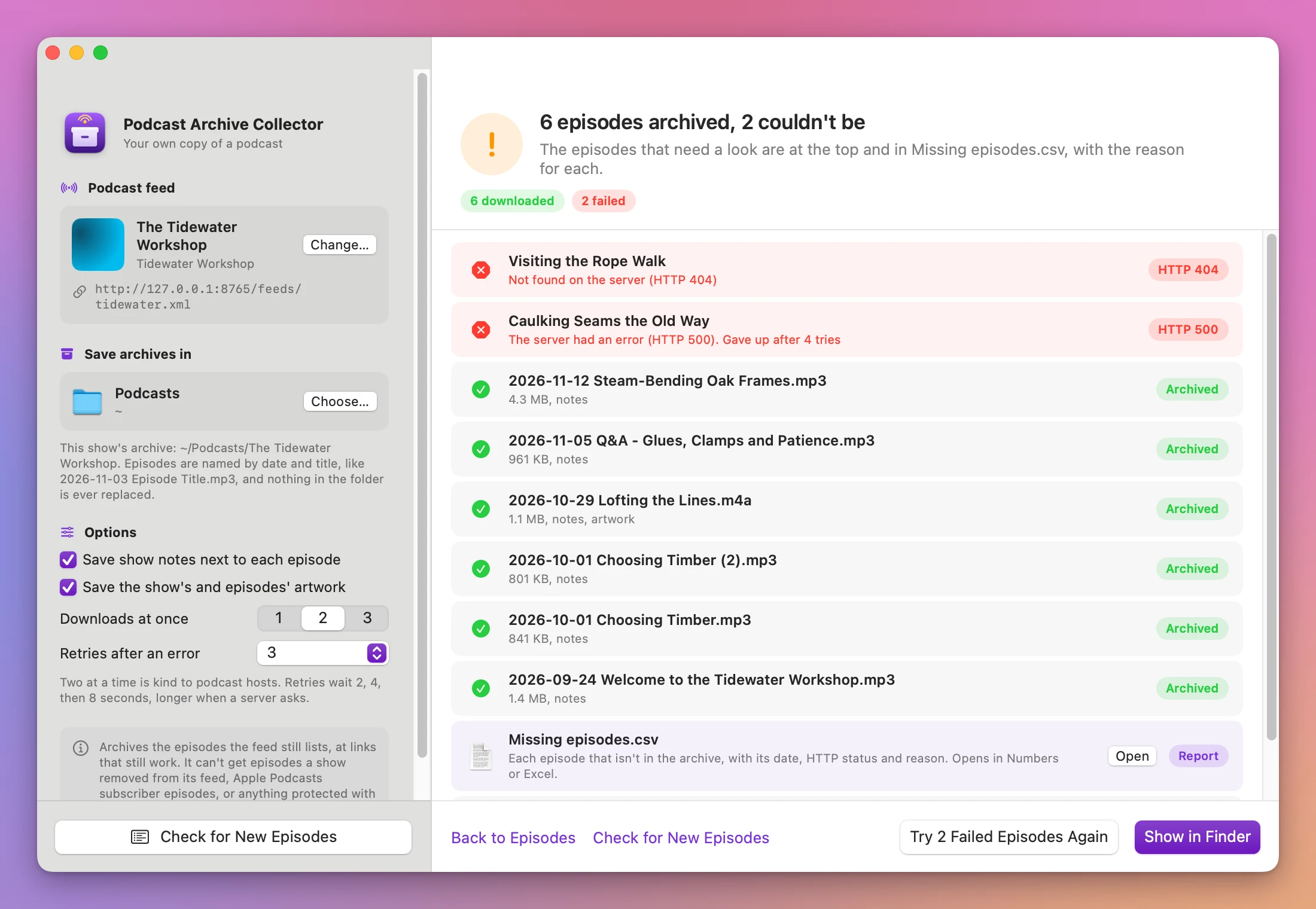
- Try 2 Failed Episodes Again retries the failures. After a stop, the button is Resume.
- Show in Finder opens the Episodes folder.
- Check for New Episodes reads the feed again.
- Back to Episodes returns to the list.
The archive folder
Podcasts/The Tidewater Workshop/
  .podcast-archive-collector.json
  feed.xml
  Feed history/feed 2026-11-20.xml
  cover.jpg
  Missing episodes.csv
  Episodes/
    2026-10-29 Lofting the Lines.m4a
    2026-10-29 Lofting the Lines.html
    2026-10-29 Lofting the Lines.jpg
    2026-10-01 Choosing Timber.mp3
2026-10-01 Choosing Timber (2).mp3.podcast-archive-collector.jsonis hidden. It holds the full feed address and what’s archived, so the next run knows what’s new.feed.xmlis the feed as of the last run, with any private key masked. When the feed changed since the previous run, the earlier copy moves to Feed history.- The
.htmlshow notes have the title, show, date, length, a link to play the episode and the feed’s notes, with scripts removed. Images in the notes still load from the web.
File names
Episodes are named YYYY-MM-DD Title.ext, with the publication date. A colon followed by a space becomes ” - ”, and slashes and colons become ”-”. The extension comes from the audio link (mp3, m4a, m4b, aac, mp4, ogg, opus, wav, flac and others), else from the file type, else mp3.
Names are reserved oldest first, before any download starts, and stay the same across runs. Two episodes with the same date and title get Choosing Timber.mp3 and Choosing Timber (2).mp3. Nothing already in the folder is replaced.
Missing episodes.csv
One row for each episode that isn’t in the archive: failed downloads, episodes the feed lists without a file, episodes you haven’t picked (“Not in the archive yet”), and archived episodes the feed dropped (“Your copy is kept”). The columns are Date, Episode, Result, HTTP status, Reason, Attempts and Audio link (masked for private feeds). The file is rewritten after every finished run and removed when nothing is missing.
Come back later
Check for New Episodes (Command-R once a feed is loaded) reads the feed again. New then ticks only the episodes you don’t have. Archived episodes the feed dropped are listed at the bottom under “In your archive, no longer in the feed”, marked Kept.
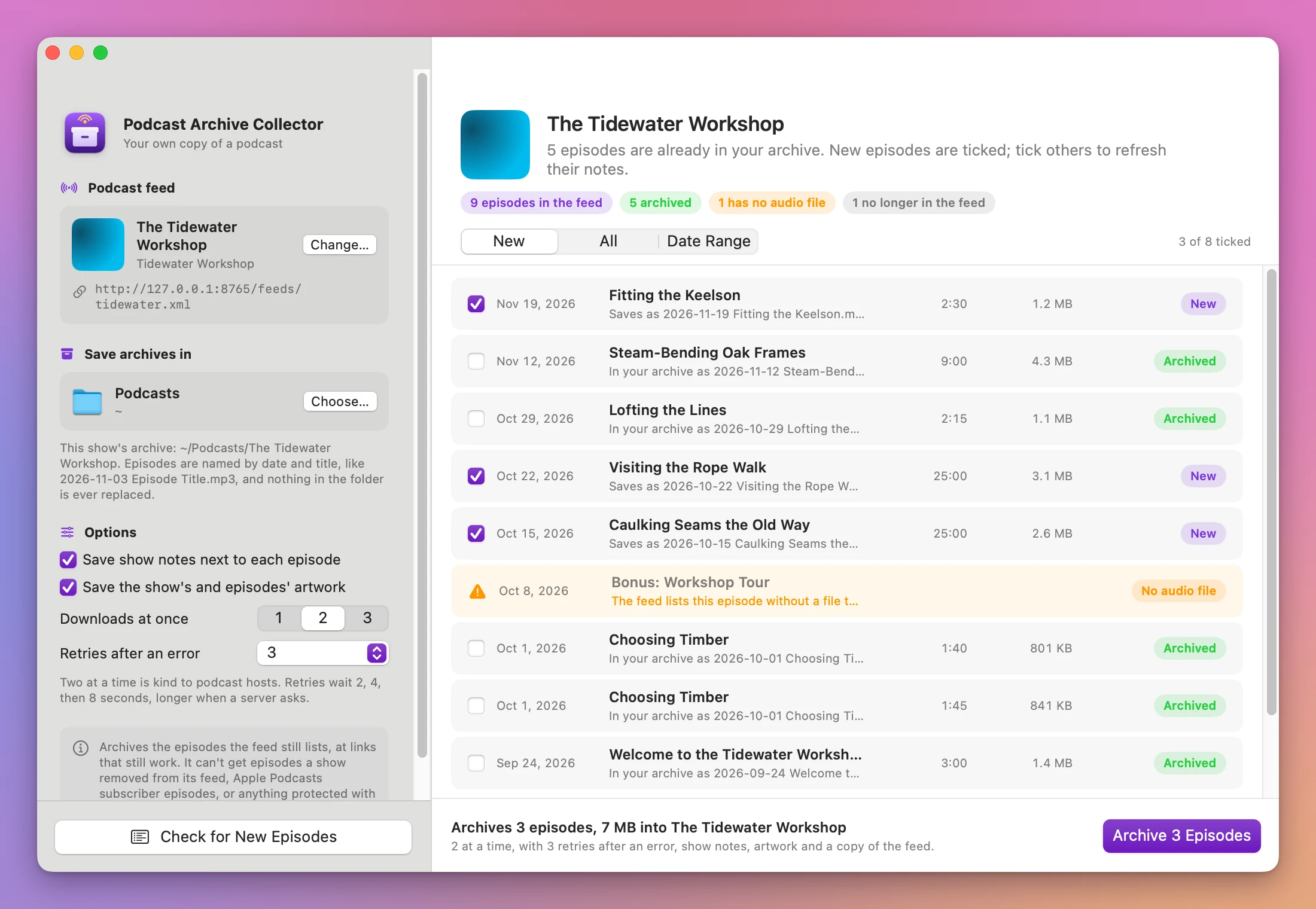
To come back after quitting the app, click Open Archive… next to Podcast feed and pick the show’s folder. The feed address is read from the folder. The folder works wherever you move it.
Resume
Partial files are hidden .part files in the Episodes folder. Resume, Check for New Episodes or a later run continue them from where they stopped, when the server supports it. If the file on the server changed in the meantime, it downloads again from the start. A dropped connection is retried from where it broke.
Limits
- Only episodes the feed still lists, at links that still work. Feeds that list only their newest episodes give only those.
- RSS 2.0 feeds only. Atom and JSON feeds aren’t read: the app says the file has no podcast channel.
- No DRM, no Apple Podcasts subscriber episodes, and no sign-in beyond a key or a user name and password in the feed address.
- Episodes that failed in an earlier run show as New in the list, not as failed.
- Resuming needs the server’s support. Without it, a retry starts the file over.
- No scheduling, no renaming single episodes, no tag editing, no transcripts or chapters.
The app connects to the feed, the artwork and audio links in it, and to the update server. Everything it saves stays on your Mac.
Podcast Archive Collector is $20, a one-time purchase.