How to use Wash Sale Checker
Wash Sale Checker
Load trade history CSVs from every brokerage account, mark the IRAs, and see the wash sales across accounts, with a window lookup before you sell.
Bought Wash Sale Checker? Sign in with the email you bought it with to download the latest version or ask me a question.
On this page
A calculator, not tax advice. Your broker’s 1099 and a tax professional have the final word. The app applies the US federal wash sale rule described in IRS Publication 550.
Install
Wash Sale Checker requires macOS 14 Sonoma or later, on Apple silicon or Intel. Download the ZIP from the order page or your Creem receipt. Unzip it and move the app to Applications.
The app checks for updates once a day. When a new version is ready, click Install and Relaunch. To check anytime, choose Wash Sale Checker → Check for Updates….
Export your trade history
From each broker, export the account’s transaction or trade history as a CSV, covering the year you’re checking plus the purchases behind the shares you sold. The app reads these layouts as they are:
- Charles Schwab (Transactions)
- Fidelity (Accounts History), including a file with several accounts
- Interactive Brokers Flex Query and Activity Statement
- Robinhood
- Webull
Any other CSV works with the Other layout, where you pick the columns. The broker layouts were built from public descriptions of each export, not tested with a real file from every broker. If the counts on a file’s card look wrong, switch it to Other and match the columns.
Add the files
Click Add CSV Files… (Command-O), or drop the files on the window. Each file gets a card with:
- a tick box to include or leave out the file
- the Layout it detected, which you can change
- an Account name, which starts as the broker’s name
- an IRA or Roth IRA tick box
- the number of buys and sales, the date range, and how many other rows (dividends, transfers, totals) were skipped
A disclosure lists each trade row left out and why: short sales, buy to close, option expirations and assignments, and rows with no quantity or price. A file with an account column (Fidelity all-accounts, Interactive Brokers) lists each account it found, each with its own IRA tick box.
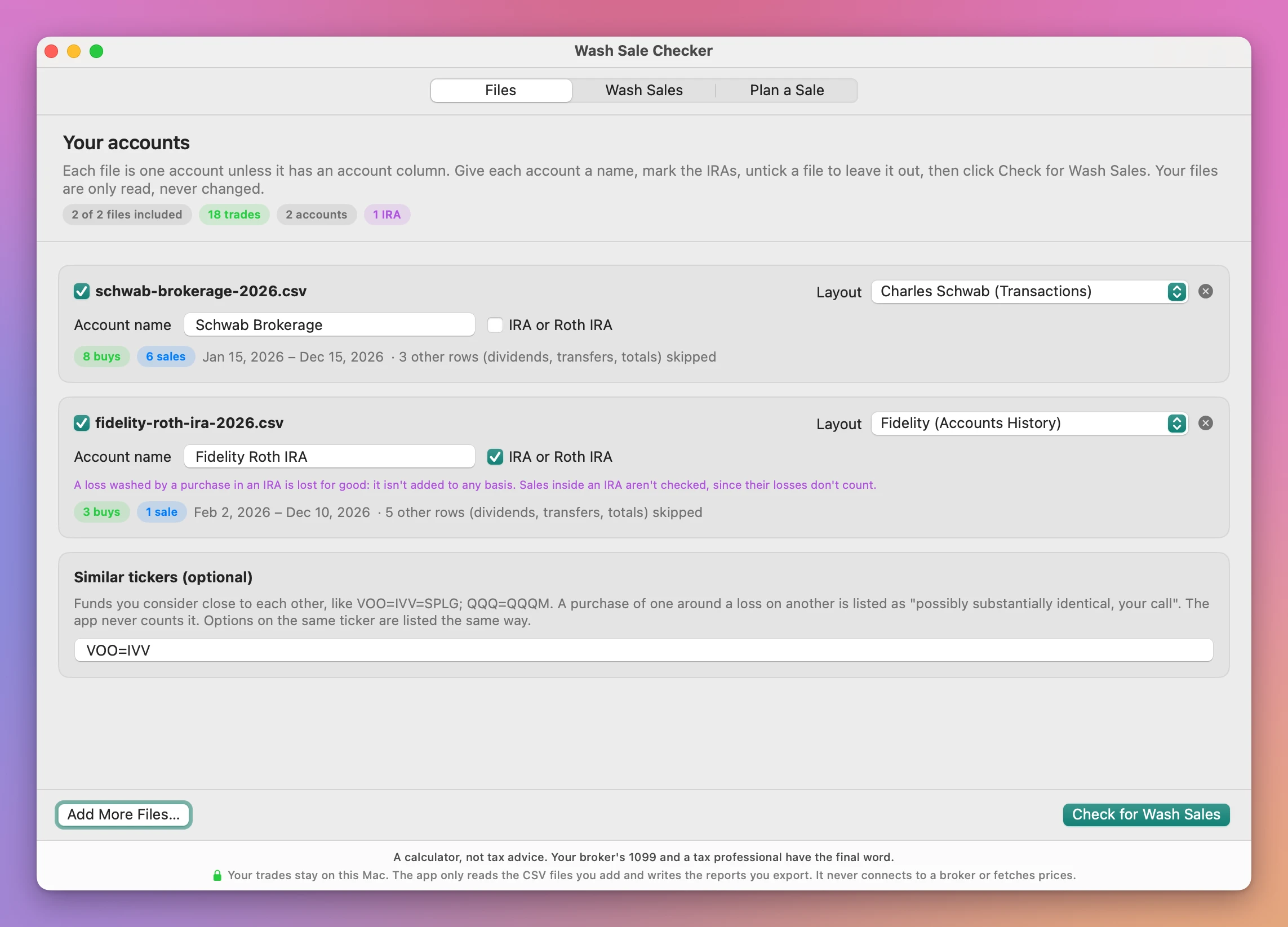
Give every account a name you’ll recognize in the report. Tick IRA or Roth IRA on every IRA: a loss washed by a purchase there is lost for good, and sales inside an IRA aren’t checked, since their losses don’t count.
Match the columns of another CSV
With the Other: map the columns layout, a grid asks which column holds the trade date, symbol, buy or sell, quantity, price, fees, amount, account, the lot bought on date and the cost basis. Date, symbol and quantity are required, plus an amount or a price. Common column names are picked for you. Without a buy or sell column, a negative quantity means a sale.
A file with no header row shows a banner like “not-a-trade-file.csv has no header row the app can read. It needs a row of column names.”
Similar tickers
In Similar tickers, type groups of funds you consider close, like VOO=IVV=SPLG; QQQ=QQQM. A purchase of one around a loss on another is listed as “possibly substantially identical, your call”. Options on the same stock are listed the same way. Neither is ever counted in the totals. This field is the only thing the app remembers between launches.
Check for wash sales
Click Check for Wash Sales. If something stops the check, the reason shows in orange next to the button.
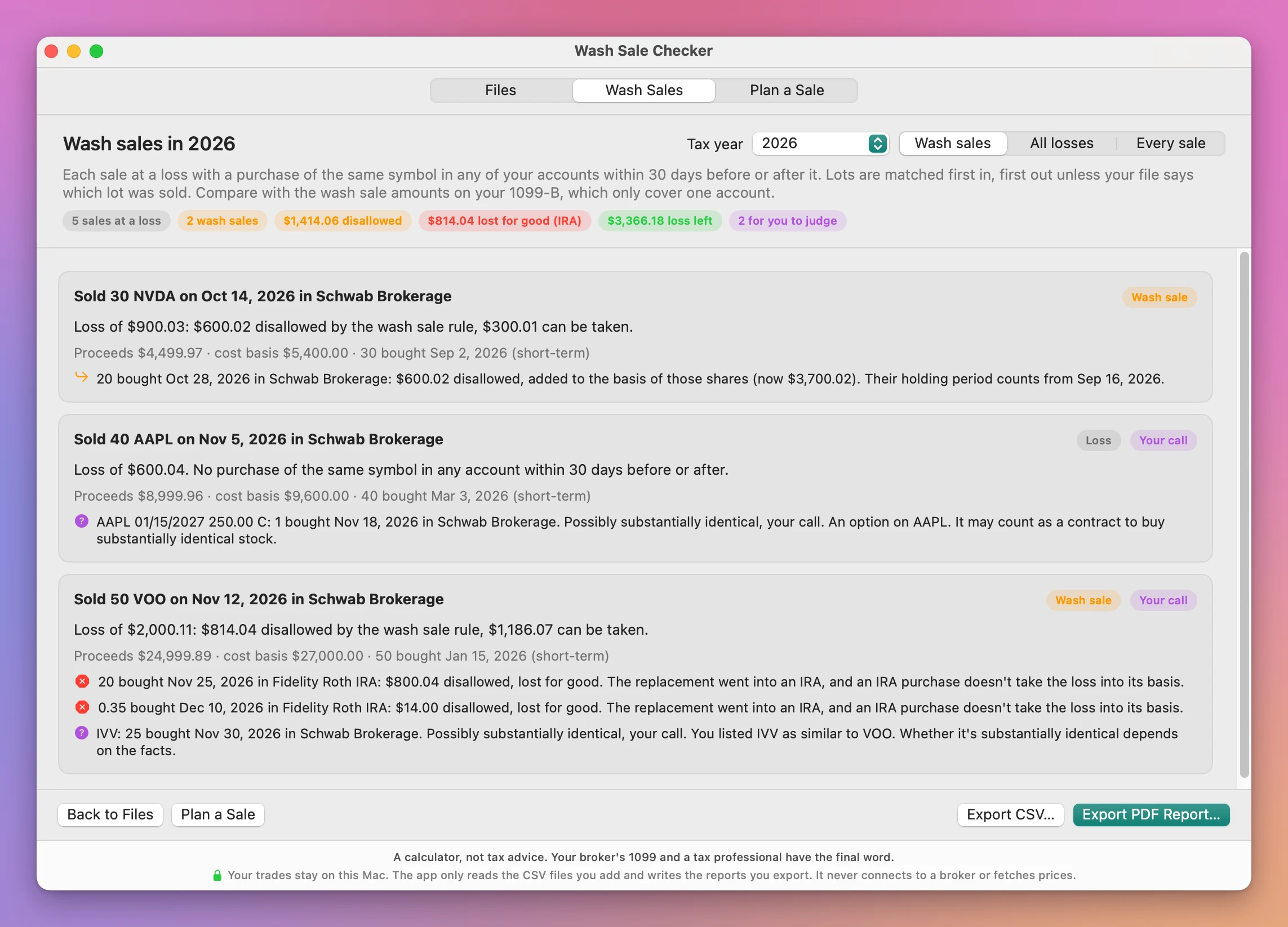
The Wash Sales tab shows:
- a Tax year picker, with All years or each year
- a filter: Wash sales, All losses or Every sale
- pills with the sales at a loss, the wash sales, the dollars disallowed, the dollars lost for good through an IRA, the loss left, and how many purchases are for you to judge
Each card starts with the sale (“Sold 50 VOO on Nov 12, 2026 in Schwab Brokerage”), the loss, the part disallowed and the part that can be taken, then the proceeds, cost basis, lots and whether it’s short- or long-term. Each matched purchase follows, with what happens to its share of the loss: added to the basis of those shares, with the new basis and the date their holding period counts from, or lost for good when it’s in an IRA. Possibly identical purchases are in purple.
A Couldn’t check card lists sales with no purchase in your files, unless the row has a cost basis column.
How the matching works
- The window is 30 calendar days before and 30 after the sale date, 61 days in all.
- Lots are sold first in, first out, unless the sale row has a lot (acquired) date.
- Replacement shares are matched in purchase order, and each share replaces a loss only once. When fewer shares are bought back than were sold, only that part of the loss is disallowed.
- The disallowed loss on a taxable purchase moves into that purchase’s basis, and its holding period includes the days the sold shares were held.
- When replacement shares were bought and sold again before the loss sale, the deferred loss goes into that earlier sale’s basis with a note, and that earlier sale isn’t checked again.
- Only trade dates are used. Trades on the same day keep the file’s order, and files listed newest first are flipped.
Plan a sale
Click Plan a Sale (or Look Up the Window for a Sale You’re Planning on the start screen). Type a symbol, or pick one from From your files, set Sold on, and click Show the Window.
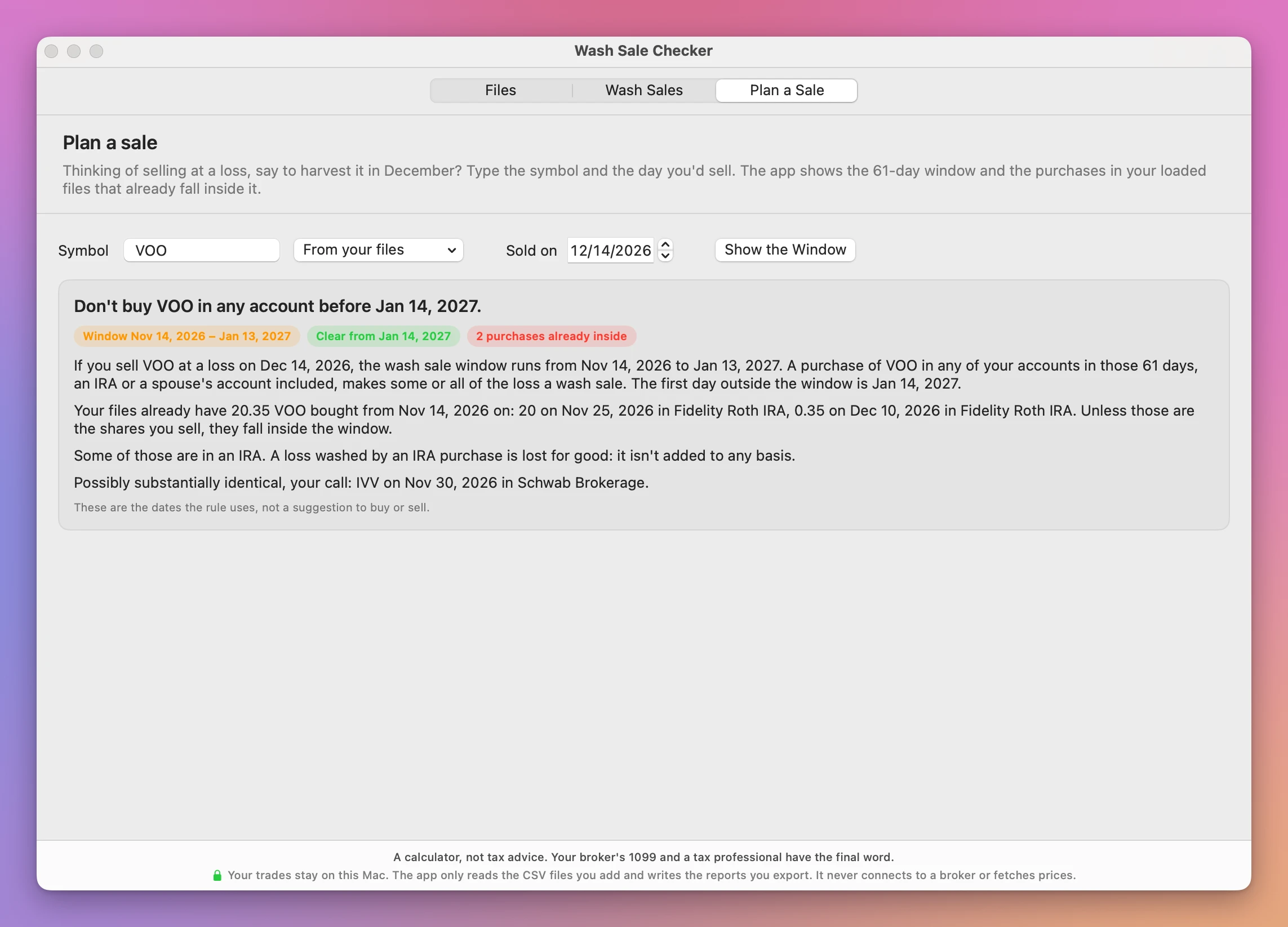
The card shows the window dates, the first day outside it, the purchases in your loaded files that already fall inside it in any account, a sentence when some are in an IRA, and possibly identical purchases. It updates when you change the date. These are the dates the rule uses, not a suggestion to buy or sell. With no files loaded, it shows only the dates.
Export
- Export PDF Report… (Command-E) saves a PDF of the results. A green line says “Saved …”, with Show in Finder.
- Export CSV… (Shift-Command-E) saves one row per matched purchase: the sale, the account, the gain or loss, the disallowed amount, the loss you can take, the replacement purchase and account, where the disallowed amount goes, the replacement’s new basis and holding period date, and the possibly identical purchases.
What it doesn’t handle
- Short sales, buy to close, option expirations, assignments and exercises are left out, each with a sentence.
- Corporate actions (splits, mergers, spin-offs, ticker changes). A split shows up as odd quantities.
- Average cost. Mutual funds that use it aren’t supported.
- Substantially identical securities other than the same ticker. Those are always your call.
Privacy
Your trades stay on this Mac. The app only reads the CSV files you add and writes the reports you export. It never connects to a broker or fetches prices. Nothing is saved between launches except the similar tickers. The app uses the internet only to check for and download updates.
Wash Sale Checker is $19, a one-time purchase.