How to use Word Batch Text Replacer
Word Batch Text Replacer
Replace text in many .docx files at once: add documents and find and replace pairs, preview every match, and save edited copies with a report of what was replaced and what was left alone.
Bought Word Batch Text Replacer? Sign in with the email you bought it with to download the latest version or ask me a question.
On this page
Install
Word Batch Text Replacer requires macOS 14 Sonoma or later, on Apple silicon or Intel. Download the ZIP from the order page or your Creem receipt. Unzip it and move the app to Applications. Microsoft Word isn’t needed.
The app checks for updates once a day. When a new version is ready, click Install and Relaunch. To check anytime, choose Word Batch Text Replacer → Check for Updates….
Add documents
Drop .docx files or a folder on the Documents box in the sidebar, or click Add…. A folder is searched with all its subfolders. Each document has a checkbox: untick one to leave it out of this batch, or click its remove button. Clear empties the list.
Files the app can’t edit show in orange with a warning sign. Hover one to see why. The app edits .docx only: .doc, .docm, .dotx, password-protected and damaged files are skipped. To include a .doc, open it in Word or Pages, save it as .docx and add the new file.
Add the replacement pairs
Click Add Pair, type the text to find in Find and the new text in Replace with. An empty Replace with deletes the text. Untick Use to keep a pair in the list without using it. The bottom bar points out a pair with an empty Find, two pairs that find the same text, and text with a line break.
To load a list, click Import CSV…. The first column is the text to find, the second its replacement. A first row of Find,Replace is read as column names. Commas and semicolons both work as separators, and a cell with a comma goes in quotes:
Find,Replace
Acme Corporation,Globex Ltd
12 Harbor Road,"40 Mill Lane, Springfield"
Northwind Traders,Contoso Partners
Export CSV… saves the current pairs to a file. The pairs, the options and the save folder are remembered between launches.
All pairs are applied at the same time to the original text. One pair’s result is never searched again by another pair.
Options
Under Search in, pick the parts of each document to search: Body text and tables, Headers and footers, Footnotes and endnotes and Text boxes. All four are on at first.
Under Matching:
- Match case finds only text with the same capitals. With it off, “acme” also matches “Acme” and “ACME”. The replacement is used exactly as typed in both cases.
- Whole words only skips matches inside a longer word.
Under Save in, click Choose… and pick a folder. The copies go into a new Edited Documents folder there.
Preview
Click Preview (Command-R). Nothing is written yet. The top of the screen counts the replacements, the exceptions and the files that can’t be edited, and a strip shows how many times each pair is replaced.
Each document has a card with every match: where it is (Body, Header, Footer, Footnotes, Endnotes, or Text box), the text around it with the old text struck through and the new text in green, and a status. A document with no matches says no copy will be made.
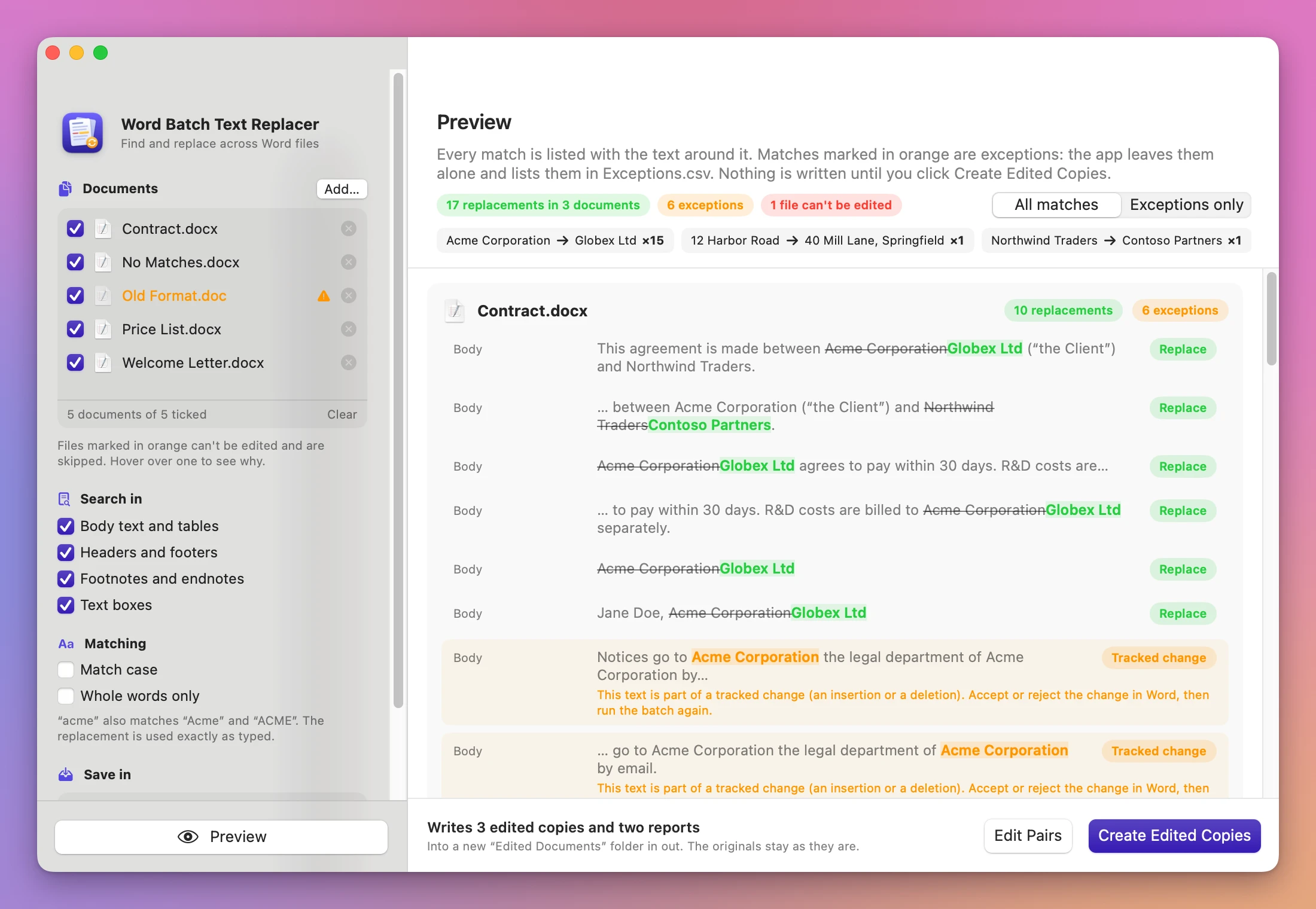
Matches in orange are exceptions. The app leaves them alone and lists them in Exceptions.csv:
| Exception | What it means | What to do |
|---|---|---|
| Tracked change | The text is part of an insertion or deletion not yet accepted | Accept or reject the change in Word, then run the batch again |
| Field | The text is inside a field, like a cross-reference, a mail-merge field or a hyperlink | Change it in Word, where the field can be edited |
| Content control | The text is inside a form field or a placeholder | Change it in Word |
| Two paragraphs | The text starts at the end of one paragraph and ends in the next | Edit it by hand |
| Overlap | Two pairs match the same characters | Change or untick one of the pairs |
Exceptions only shows just these. Edit Pairs goes back to the pairs.
Create the copies
Click Create Edited Copies. The done screen lists each copy with its number of replacements, the two reports, and under Not copied the documents with no matches and the skipped files with the reason. Open Exceptions.csv opens the report, Show in Finder opens the folder, and Start Another Batch goes back to the start.
The output folder contains:
- one edited
.docxper document with at least one replacement, with the same name (two documents with the same name from different folders becomeName.docxandName (2).docx) Replacements.csv: document, edited copy, where, find, replace with, and the text before and after each matchExceptions.csv: document, where, find, problem, the text around it, and what to do, plus a line for each skipped file
If Edited Documents already exists, the app makes Edited Documents 2, and so on. The folder appears only when every copy is finished.
How the edit works
The app changes only the text it replaces. Every other part of the file is copied as it was. Word often splits a phrase into several pieces with different formatting. A match across those pieces is found, and the replacement takes the formatting of the first piece. If the match starts with a bold letter, the whole replacement is bold.
Limits
- Matches stay inside one paragraph. Text across a line break or a tab inside a paragraph isn’t matched.
- Not searched: comments, link addresses, document properties (title and author), charts, SmartArt and embedded objects.
- A match that ends in one table cell and continues in the next can show up as a Two paragraphs exception.
- Files over 4 GB aren’t supported.
- The edited copies were checked in LibreOffice and with macOS’s own text tools, not in Microsoft Word or Pages.
Everything happens on your Mac. The app uses the internet only to check for and download updates.
Word Batch Text Replacer is $20, a one-time purchase.